Before the IDE: How the Code Editor Became a Working Surface
The history of the code editor explains how programmers moved from line commands to interactive tools that reveal, organise and check code as it is written.
The most common mistake in tracing the history of the code editor is to treat each new tool as a faster way to type. That misses what changed: programmers gained a working surface that could show more of a program, respond to edits immediately and connect code to the tools that run it. The history of the code editor is a story about changing what a programmer can see and do at once.
What did editing look like before a screen?
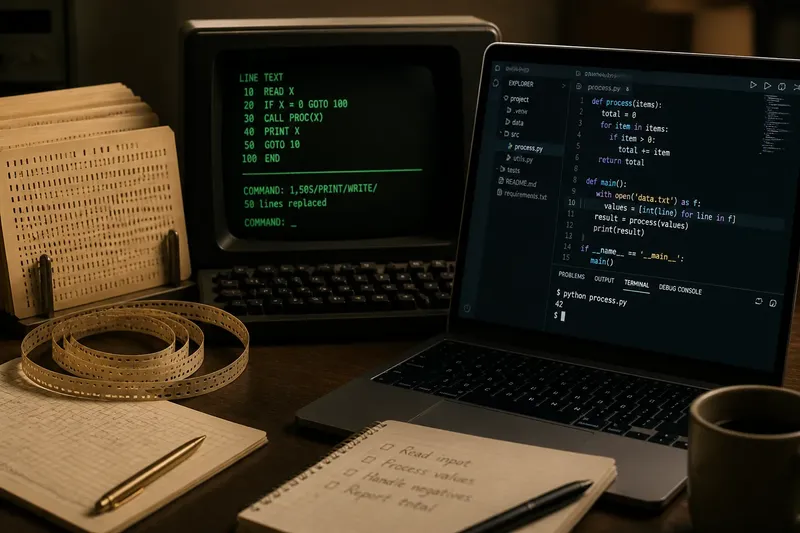
Early programs were often prepared as physical media for machines to read. Depending on the system, a programmer might arrange instructions on punched cards or paper tape, then submit the material for processing. An edit could mean replacing a card, reordering a deck or preparing a fresh copy rather than changing a line on a display.
This way of working made the program’s physical sequence prominent. A misplaced card or damaged tape could interfere with the input, while a correction might involve handling the surrounding material as well. The code existed as instructions, but the programmer’s view of it was a stack or strip that had to be prepared for a separate machine.
As interactive terminals became available, programmers could communicate with a computer during a session. Many terminals were text-based, and some editors treated a file as a sequence of numbered lines. The user issued commands to inspect, insert, replace or remove lines; the editor did not need to display the whole file as a page.
How did line-oriented editing change the work?
A line-oriented editor is controlled through commands that operate on lines or ranges of lines. This suited terminals with limited display capacity and made editing possible without a graphical interface. A programmer could ask for a portion of a file, apply a substitution or move to another section using text commands.
For example, a command might replace one spelling with another across a selected range. That is efficient when the target is unambiguous, but a broad replacement can also alter text the programmer meant to keep. The editor’s response is textual too, so the user must track the active file, line range and command effect rather than rely on a persistent page view.
Line editing also encouraged a useful distinction between the file and its current display. The visible lines were a selected window into a larger sequence, not necessarily the whole program. That idea remains in modern editors: a screen shows a viewport, and scrolling changes what is visible without changing the underlying file.
Why did full-screen editors feel different?
When terminals could show a page of text and accept cursor movement, editors began to support direct interaction with the displayed document. A programmer could move to a visible position, insert or remove characters, and see the surrounding lines remain in view. The working surface became less like a command prompt operating on a file and more like a document being manipulated directly.
This change reduced the mental effort of remembering where a line sat relative to the rest of a routine. The screen could preserve nearby context while an edit was made, much as a desk keeps a sheet of paper in view while a pencil changes one sentence. The analogy is limited: an editor can search, rearrange and represent text in ways paper cannot, but both make surrounding context available during a correction.
Full-screen editing did not eliminate commands. Search, replacement, navigation and file operations remained important, and many tools combined command modes with direct cursor editing. The shift was not from commands to no commands; it was towards a surface where commands and visible text could work together.
When did an editor become an environment?
A code editor becomes part of an integrated development environment, or IDE, when it is joined to other programming tools in a coordinated workspace. These may include a compiler or interpreter, a debugger, project navigation, search across files and a way to inspect errors. The editor remains the place where source text is changed, but the surrounding environment can help connect that text to a running program.
Syntax highlighting is one visible change: the editor colours parts of the text according to patterns it recognises, such as strings or language keywords. It does not prove that code is correct. Autocompletion can suggest names or language constructs while a programmer types, and diagnostics can flag possible problems, but these features depend on what the tool understands about the project.
Some editors stay deliberately small and rely on extensions or separate terminal commands. Others bundle project views, debugging controls and language services into one application. Neither arrangement is automatically better. A small editor can suit a focused task, while an IDE can reduce context switching when a project needs several connected tools.
How should you choose a working surface today?
Begin with the kind of work you expect to do, not with a feature list. For a short script, a basic text editor with clear file handling may be enough. For a project spread across many files, useful features might include project-wide search, navigation to a symbol’s definition, an integrated terminal or a debugger.
- Check language support: confirm that the editor recognises the language and can provide relevant highlighting or diagnostics.
- Check file visibility: see whether you can locate related files and move between them without losing your place.
- Check feedback: find out how errors and warnings are displayed, and whether they point to a useful location.
- Check the workflow: consider whether you can run or debug the program without repeatedly switching tools.
- Check distractions: decide whether panels, suggestions and prompts clarify the work or compete with it.
Say you are learning Python and have a single script that reads a text file. You might start in a lightweight editor, use its terminal to run the script, then move to an IDE if you later need to trace execution or manage several related files. The observable change would be a workspace that brings those extra tasks together, not an automatic improvement in the program itself.
What do readers often ask about code editors?
Is a code editor the same as a text editor?
A code editor is a text editor configured for programming, often with features such as language-aware highlighting, search or diagnostics. The boundary is informal: a general text editor may gain programming features through extensions, while a code editor can still edit ordinary text.
Is an IDE always better than a lightweight editor?
No. An IDE can bring connected tools into one workspace, while a lightweight editor may be easier to configure and use for a small task. Choose based on the work you need to do and how much assistance you want visible.
Does syntax highlighting check whether code is correct?
Not by itself. Highlighting marks text patterns so they are easier to distinguish, whereas diagnostics or a compiler may identify particular errors. Even those checks cover only what the relevant tool can detect.
Why do some editors use keyboard commands instead of menus?
Keyboard commands can make frequent actions quick and can work well in text-only environments. Menus make options easier to discover, so editors often offer both approaches for the same task.
What changed, and what stayed the same?
The code editor’s working surface moved from physical input and line commands towards a persistent, interactive view connected to increasingly capable tools. Each change offered a different balance between direct control, visible context and assistance. None removed the need to understand what the program’s text says.
That is the useful point in the history of the code editor: treat an editor as an instrument for making code legible and manageable, not as a substitute for knowing what an edit does. A well-chosen surface helps you keep the relevant parts of a program in view, while the responsibility for judging the change remains with you.