Braces, Indentation or an End Keyword: How to Read Code Blocks
Braces, indentation or an end keyword each makes code blocks visible differently; learn which convention suits your language and how to read its structure.
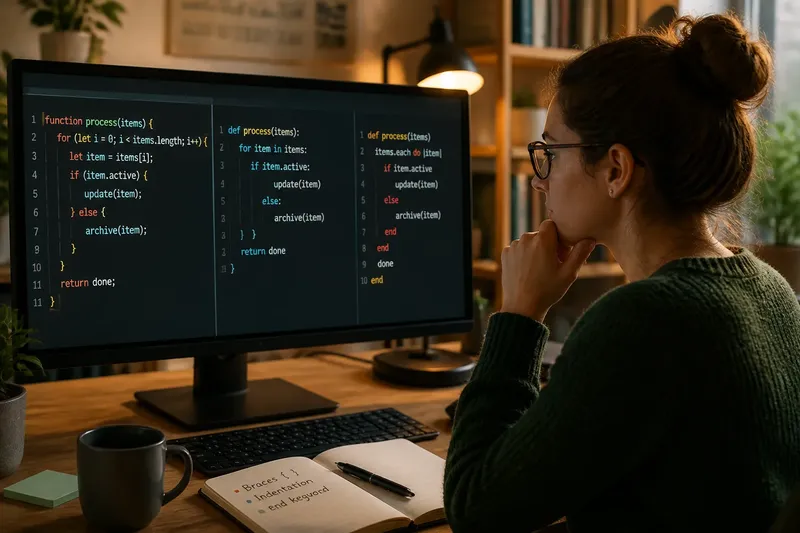
The common mistake when reading unfamiliar code is to treat every block marker as decoration. That can make a reader miss where a loop stops, mistake a nested condition for a separate one, or overlook that indentation itself changes the program. Braces, indentation and end keywords all mark code blocks, but they ask you to notice different things.
A code block is a group of statements treated as one unit, often under a condition, loop, function or class. The boundary convention tells both the language and the reader where that group begins and ends. Which convention fits best depends on what you are doing: reading a codebase, choosing a first language, or working in a team with an established style.
What should you notice before comparing block styles?
Start by looking for the construct that introduces the block: perhaps if , for , def or function . Then find the corresponding boundary: a closing brace, a change in indentation, or a word such as end . The exact spelling varies by language, but the reading task is the same: identify which statements belong to which construct.
Nested blocks are the useful test. If an if sits inside a loop, the code must show both the inner boundary and the outer one. A clear convention lets you trace those layers without guessing; a cluttered page can make even correct boundaries hard to see.
When are braces the best fit?
Braces mark the start and finish of a block with visible characters, usually { and } . You will encounter them in languages such as C, Java, JavaScript and C#. Their main reading advantage is that the boundary remains explicit even when the lines inside the block are reindented.
Braces can suit code with many nested blocks or code that is moved between editors and formatting styles. A closing brace also gives the reader a distinct visual signal that a block has ended. The trade-off is that a file with many nested braces can acquire a long column of closing marks, and a misplaced brace may attach statements to the wrong block.
Say you are reading a short JavaScript function in which an if sits inside a loop. The opening braces show where the loop and condition begin, while their matching closing braces mark each end; if the indentation is later changed by a formatter, those boundary characters still identify the grouping. Indentation remains useful here, but braces carry the formal boundary.
When reading braced code, pair openings and closings rather than relying on the left edge alone. Many editors highlight a matching brace when the cursor is beside one. That is a convenient way to check the extent of a block without trying to count several levels by eye.
When should indentation define the block?
In Python, indentation is part of the syntax: statements indented under a header belong to its block, and a return to the earlier indentation level marks the block’s end. This makes the shape of the code do more than guide the eye; it helps determine how the program is grouped.
Indentation-based blocks can be a good fit when you want the visual hierarchy to stay prominent and the language’s conventions are applied consistently. There are no closing braces to scan past. The corresponding responsibility is to keep indentation aligned: a line shifted to the wrong level may change the grouping or cause a syntax error.
For a Python reader, compare the indentation of each statement with the line that introduced its block. A statement at the same indentation as the if header is outside that if ; one level farther in belongs to it, subject to the language’s block rules. Tabs and spaces can be an extra source of confusion, so use the project’s established editor and formatting settings rather than mixing styles casually.
Think of indentation like the edges of nested trays: each deeper level sits inside the one above it. The analogy helps you see hierarchy, but code is not merely arranged on a page; in an indentation-based language, that arrangement has syntactic force.
When does an end keyword make blocks easier to read?
Some languages use a word such as end to close a block. In Ruby, for instance, blocks introduced by constructs such as if , def and class are commonly closed with end . The closing word names no particular construct, so the reader uses the opening line, indentation and surrounding context together to see what has ended.
This convention can suit code where explicit closing lines help mark boundaries but punctuation-heavy braces are not the preferred style. It is especially readable when indentation is tidy and each block’s closing end lines up with its opener. In deeply nested code, several identical closing words may be less immediately distinctive than paired braces.
To read such a section, track the opening constructs in order and match each closing keyword to the most recently opened block that has not yet been closed. Good indentation makes that relationship easier to follow. If a file looks ambiguous, inspect a smaller surrounding section rather than inferring structure from one isolated line.
Which convention fits your situation?
There is no universally best marker. Choose based on the language and the work in front of you, not on the idea that one style is inherently more readable for everyone.
- You are learning a language already chosen for a course or project: follow its native convention. Learning to recognise the language’s actual block boundaries is more useful than translating them into a style from another language.
- You are reading a braced codebase: use matching braces to trace scope, then use indentation as a second visual cue. This is helpful when formatting varies between files.
- You are reading Python: treat indentation as syntax, not optional neatness. Check which lines share the header’s indentation and which sit within its block.
- You are reading Ruby or another language with closing keywords: identify the opening construct and follow the indentation down to its corresponding end . Context matters because the same closing word can finish different kinds of blocks.
- You are choosing a language for a small teaching example: consider what you want the learner to notice. Braces make paired boundaries explicit; indentation makes visual levels central; end keywords give blocks a readable closing word.
- You are collaborating on an existing project: keep to its formatter and local style. A consistent codebase is easier to scan than one where each contributor applies a different block convention.
These choices concern how block boundaries are written, not what the block does. A loop still repeats work, and a condition still selects a path, regardless of whether its boundary is marked by braces, indentation or an end keyword.
What questions help you read unfamiliar block syntax?
How do I tell which statements belong to a block?
Find the opening construct and follow the language’s rule for closing it: pair braces, compare indentation, or locate the matching end keyword. Then check whether nested blocks intervene before the boundary you first noticed.
Can indentation matter in a language that uses braces?
Usually, indentation helps people see nesting but does not replace the braces that define the block. A formatter can alter the visual spacing without changing those boundaries, although misleading indentation can still confuse a human reader.
What should I do if the closing marker is hard to match?
Use the editor’s brace matching or syntax highlighting if available, and inspect the nearest opening construct. If the block remains difficult to follow, reformatting with the project’s standard formatter can make its existing structure clearer.
Are end keywords and braces interchangeable?
They serve a similar boundary-marking purpose, but they are not interchangeable pieces of syntax. Each language defines its own rules, so write and interpret blocks according to that language rather than substituting one convention for another.
How can you build a reliable reading habit?
When you meet an unfamiliar block, read its opening line, identify the boundary convention, then follow the statements inward and back out. Pay particular attention where one block starts inside another: that is where a misplaced visual assumption can change your understanding of the code.
For the search phrase braces, indentation or end keyword, the useful answer is situational: braces keep boundaries explicit, indentation makes visual levels part of the syntax in languages such as Python, and end keywords close blocks with a readable marker. Once you know which rule the language uses, the code’s shape becomes easier to read without mistaking presentation for structure.